FinRobot
FinRobot Desktop — V2
The production FinRobot. Investment-bank-grade equity research in a desktop app: deterministic finance numbers plus LLM narrative, with every figure traceable back to a function call.
FinRobot Desktop is an open-source equity research workstation for analysts, quantitative researchers, and active investors. A single research run produces a 13-chapter artifact — Cover, Investment Thesis, Company Overview, Financial Analysis, Valuation, Recent News, Sensitivity, Catalysts, Technical & Advanced, Competitive Landscape, Financial Data, Ownership & Governance, Disclaimer.
The core bet: numbers are computed by code, judgment is supplied by the LLM. The model never emits a figure that cannot be traced back to a call in finrobot/engine/compute/.
This is V2 in the FinRobot version lineage, and it is the generation meant for real work. What makes it the production system rather than a larger demo:
- 32 deterministic operators compute every financial figure in pure Python — the LLM narrates them, it does not produce them.
- 6 audit operators check the narrative back against the numbers and flag drift before a report ships.
- A typed pipeline runtime with per-step validators and retry, rather than an open-ended agent conversation.
- 7 data providers behind failover, with response validation that rejects malformed payloads before they reach the compute layer.
- 237 test files, property-based tests, and CI across Python 3.11/3.12 and Node 22/24.
The other two generations serve different purposes: finrobot_equity/ (V1) is a self-hosted web app for browser-based report generation, and finrobot_autogen/ (V0) is the educational AutoGen library behind the whitepaper.
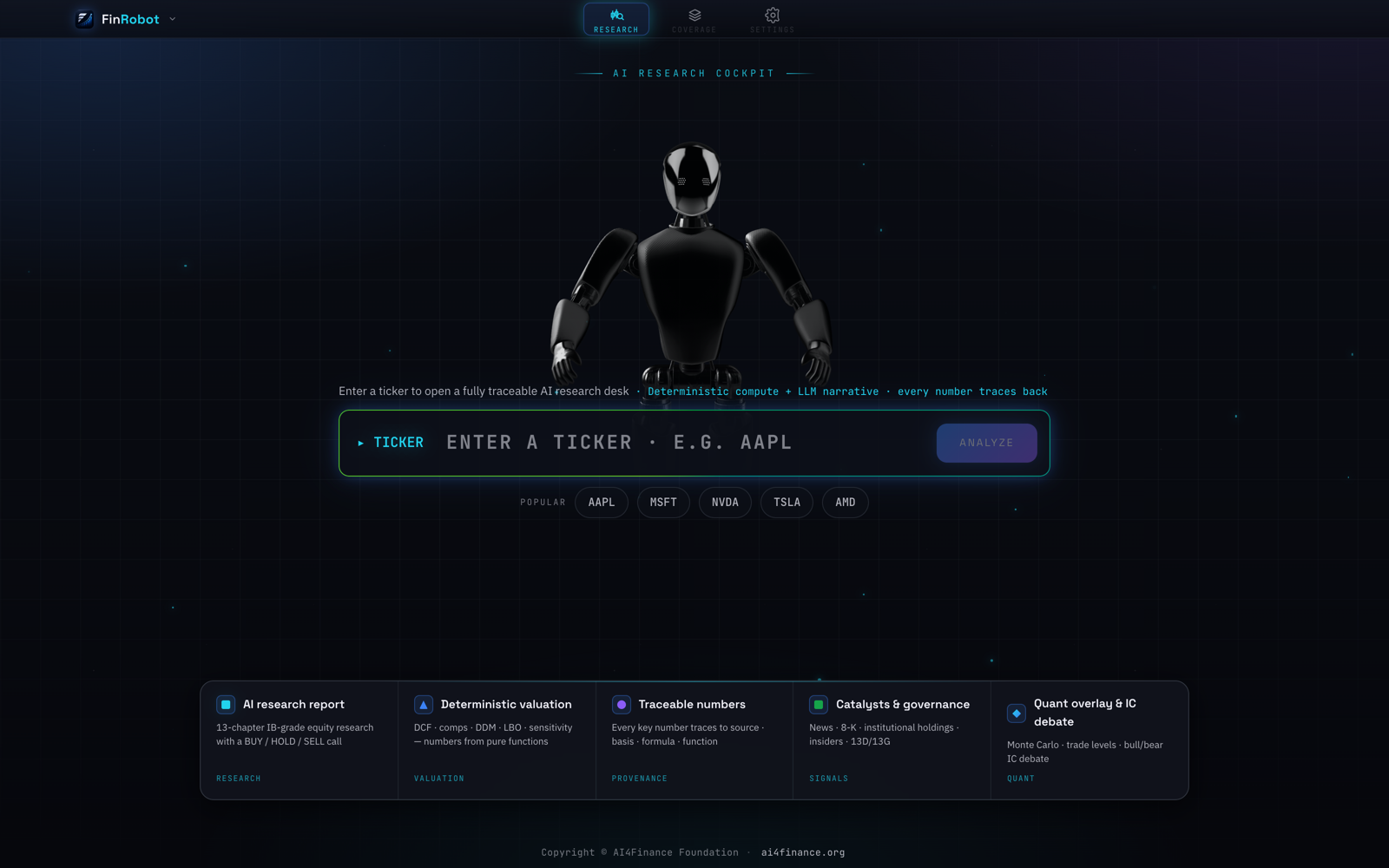
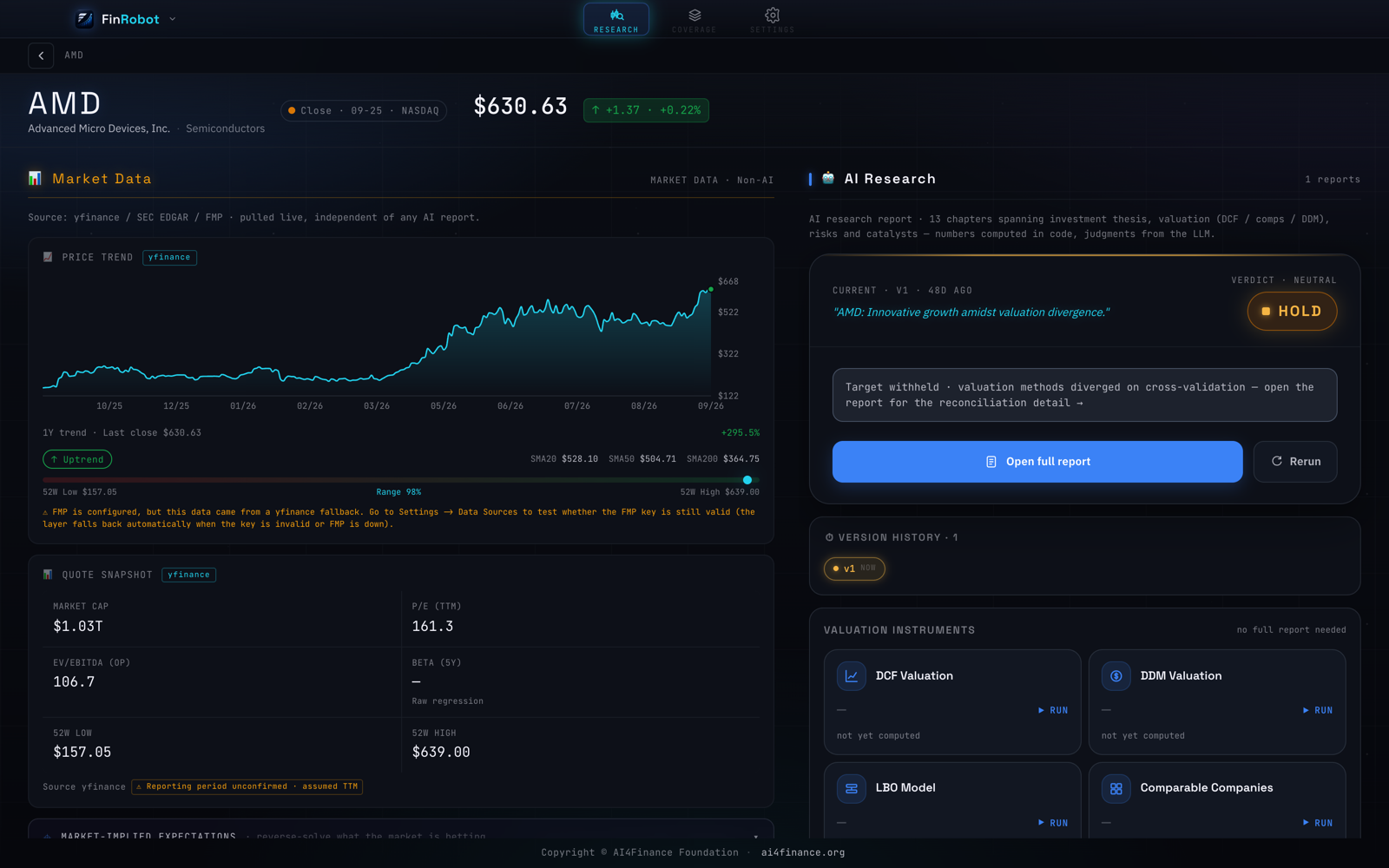 |
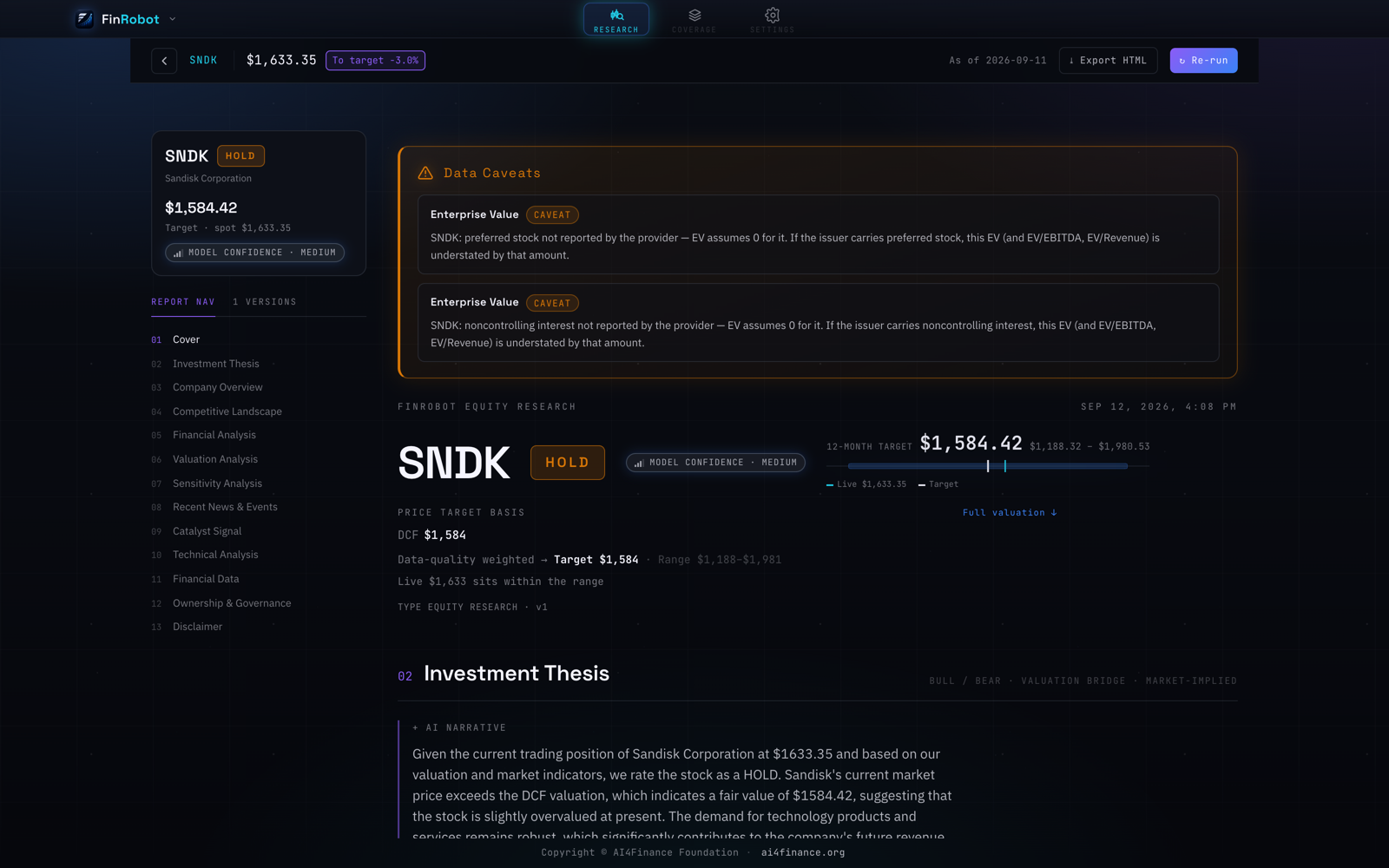 |
| Stock workspace — live market data pulled independently of any AI report, beside the research verdict and the valuation instruments. | Research report — 13 chapters, a 12-month target with its range, model confidence, and the caveats the audit operators raised. |
How it works
The app ships as a single .app containing two binaries that talk over local HTTP:
finrobot-desktop— the Tauri shell: native window, menu bar, and the React UI.finrobot-server— a self-contained Python backend (FastAPI + PydanticAI + the deterministic compute engine), launched automatically in the background on127.0.0.1:8321.
You never start anything by hand. Opening the app boots the backend; quitting it shuts the backend down. No Python, no uv, and no source tree are required on the user’s machine.
Architecture
                       Tauri shell (Rust) ── React 19 UI
                                 │  HTTP  127.0.0.1:8321
                       FastAPI routes ── PydanticAI agents
                                 │
          ┌──────────────────────┼──────────────────────┐
     pipelines              compute engine          data layer
  (7 workflows)      (32 pure-Python operators)   (7 providers,
                                                   with failover)
                                 │
                          artifact store (SQLite)
Agents
Nine agents, each defined by a markdown instruction file in finrobot/engine/agents/instructions/:
| Group | Agents | Role |
|---|---|---|
| Pipeline | data, analysis, modeling, synthesis, report |
The main research chain — gather, interpret, model, reconcile, write |
| Debate | bull, bear, judge |
Argue the long and short case, then adjudicate |
| Orchestration | lead agent (factory.py, orchestrator.py) |
Routes the request and sequences the rest |
Because instructions are plain markdown, changing an agent’s behavior does not require touching Python.
Pipelines
Seven workflows in finrobot/engine/pipelines/, each a sequence of typed steps with validators and retry:
| Pipeline | CLI | Output |
|---|---|---|
equity_research.py |
finrobot research |
Full 13-chapter research artifact |
dcf.py |
finrobot dcf |
Discounted cash flow valuation |
ddm.py |
finrobot ddm |
Dividend discount model |
lbo.py |
finrobot lbo |
Leveraged buyout model |
comps.py |
finrobot comps |
Comparable-company analysis |
earnings_analysis.py |
finrobot earnings |
Earnings review |
ic_memo.py |
finrobot ic-memo |
Investment-committee memo |
finrobot dcf automatically falls back to DDM for companies where a dividend model is the more defensible approach; pass --force-dcf to override.
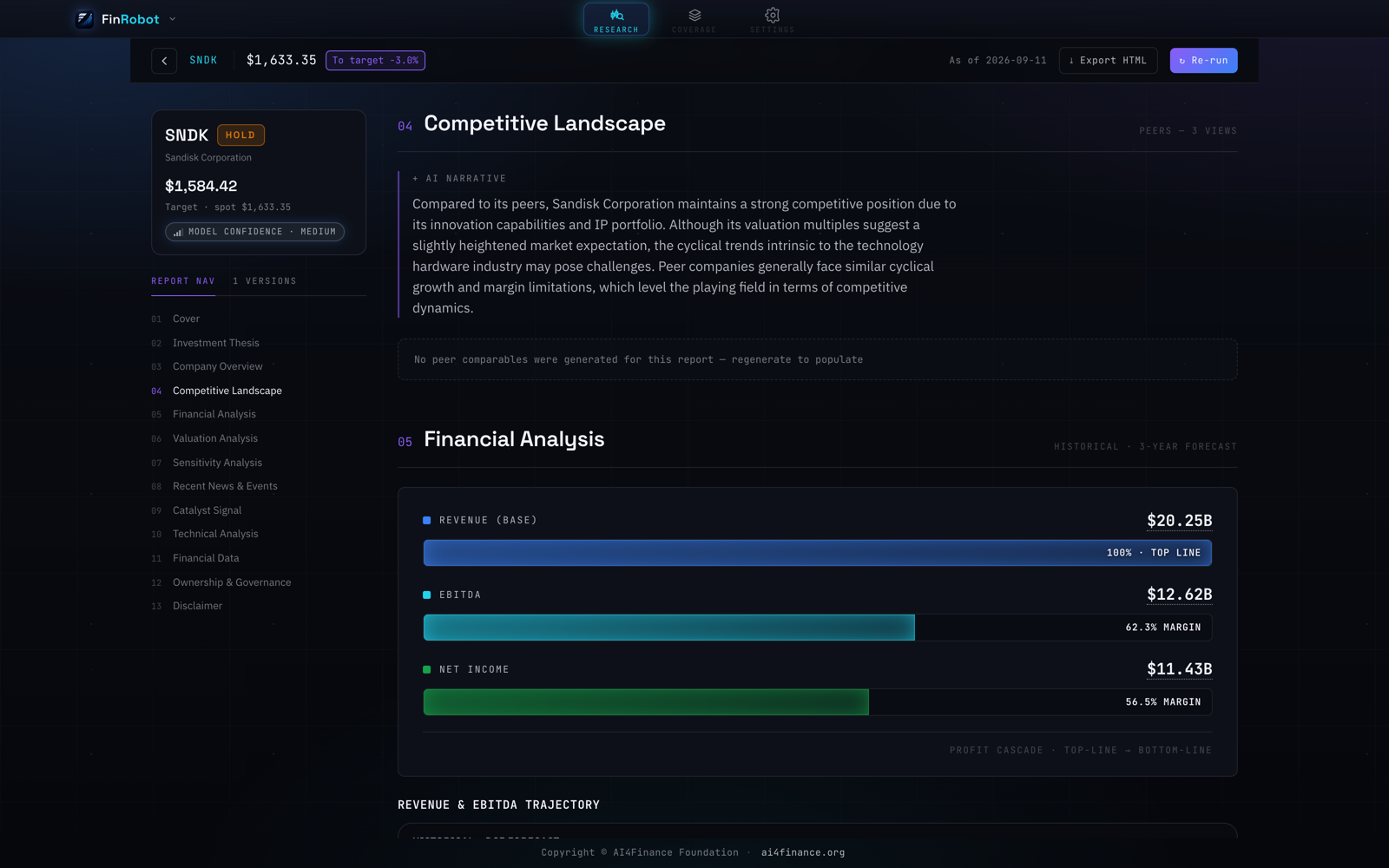
The equity_research pipeline's financial-analysis chapter — profit cascade from revenue to net income, with margins.
Deterministic compute
finrobot/engine/compute/ is the part the LLM is not allowed to improvise around:
- 26 operators —
dcf,ddm,lbo,multiples,monte_carlo,sotp,residual_income,peer_screen,forward_estimates,fx_normalize,ownership,catalyst,signal, and their seed variants. - 6 audit operators —
currency_caliber,ev_bridge,narrative_divergence,narrative_numeric_grounding,sector_sign,ttm_period. These check the narrative against the numbers and flag drift. - 7 coordinators — assemble operator inputs from the data layer (
extractor,historical_extractor,segment_extractor,market,news,dcf_seed,technical_payload).
Everything here is pure Python with no model in the loop, which is what makes the numbers reproducible and the provenance checkable.
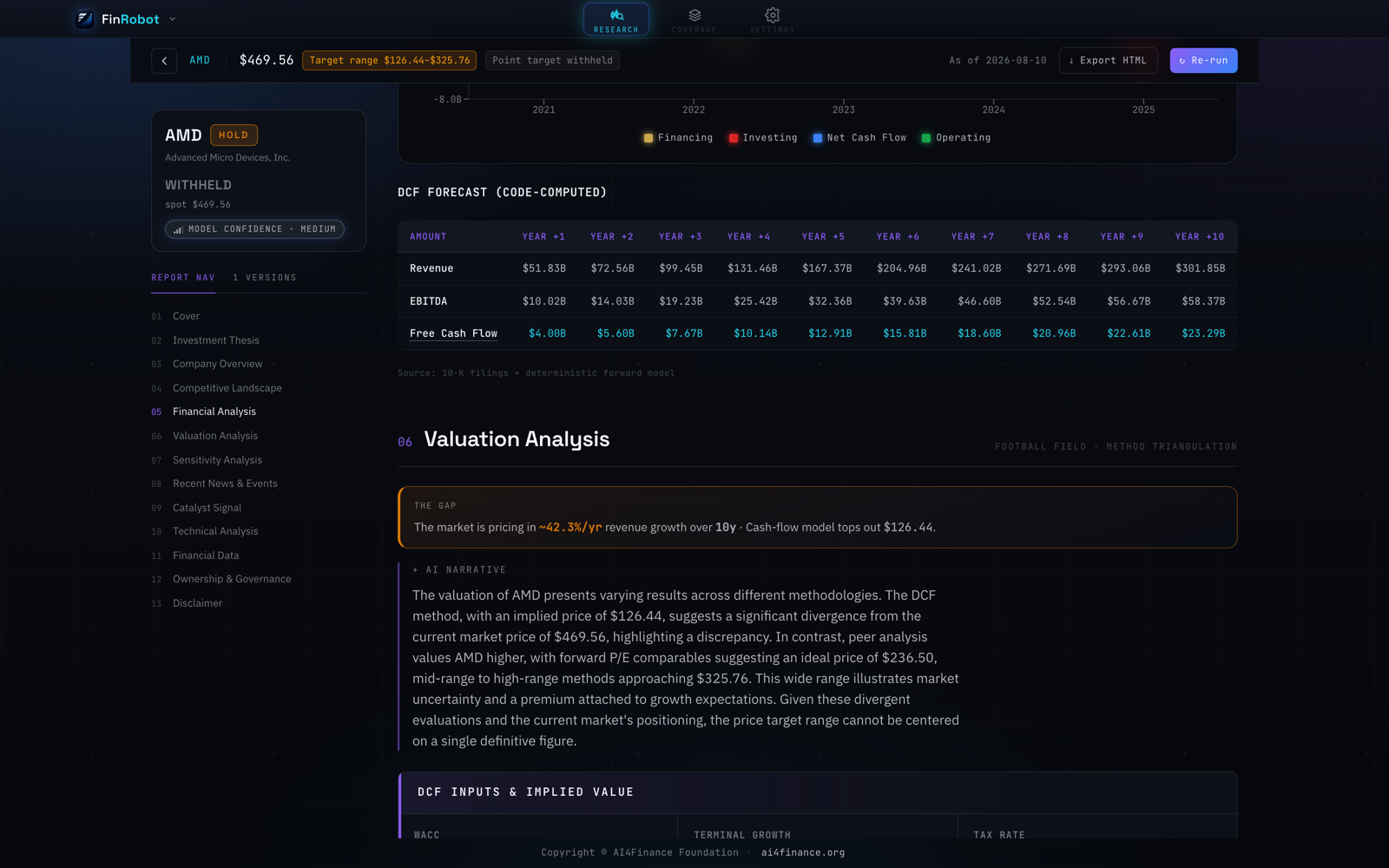
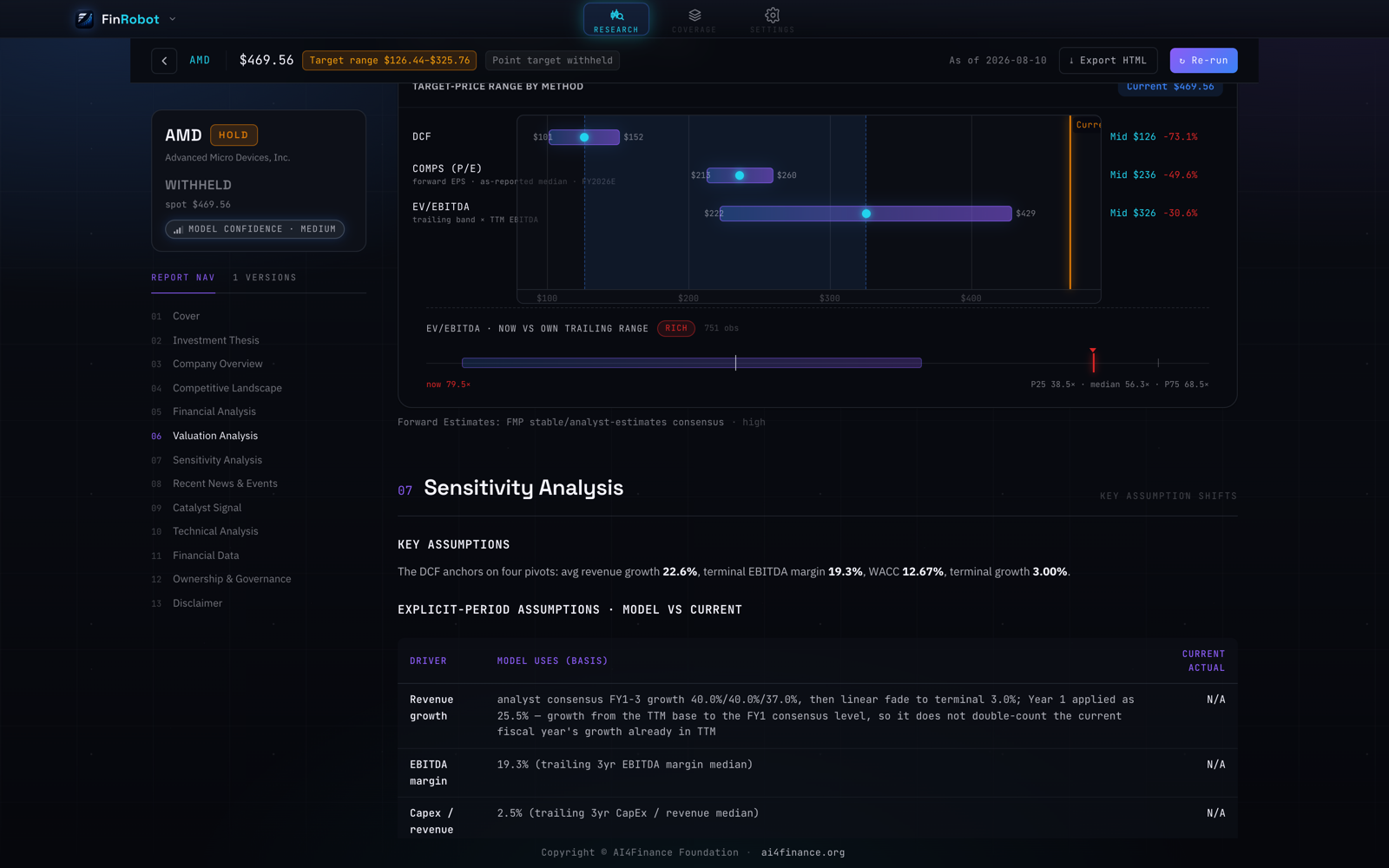
Top: the DCF table is labelled code-computed — ten years from pure-Python operators — while the paragraph beside it is the LLM reading those numbers back.
Bottom: the football field triangulates three methods — DCF, forward-P/E comps and EV/EBITDA. They diverged 2.6x here, so the point target was withheld and only the range ships; each assumption still states the basis it came from.
Data layer
Seven providers in finrobot/engine/data/providers/, behind a common interface with health tracking and automatic failover:
yfinance · edgar (SEC) · fmp · finnhub · adanos (retail sentiment) · news_aggregator · fx
Supporting pieces: response caching, a symbol index, quote batching, SEC holdings sync, and a validator that rejects malformed provider payloads before they reach the compute engine.
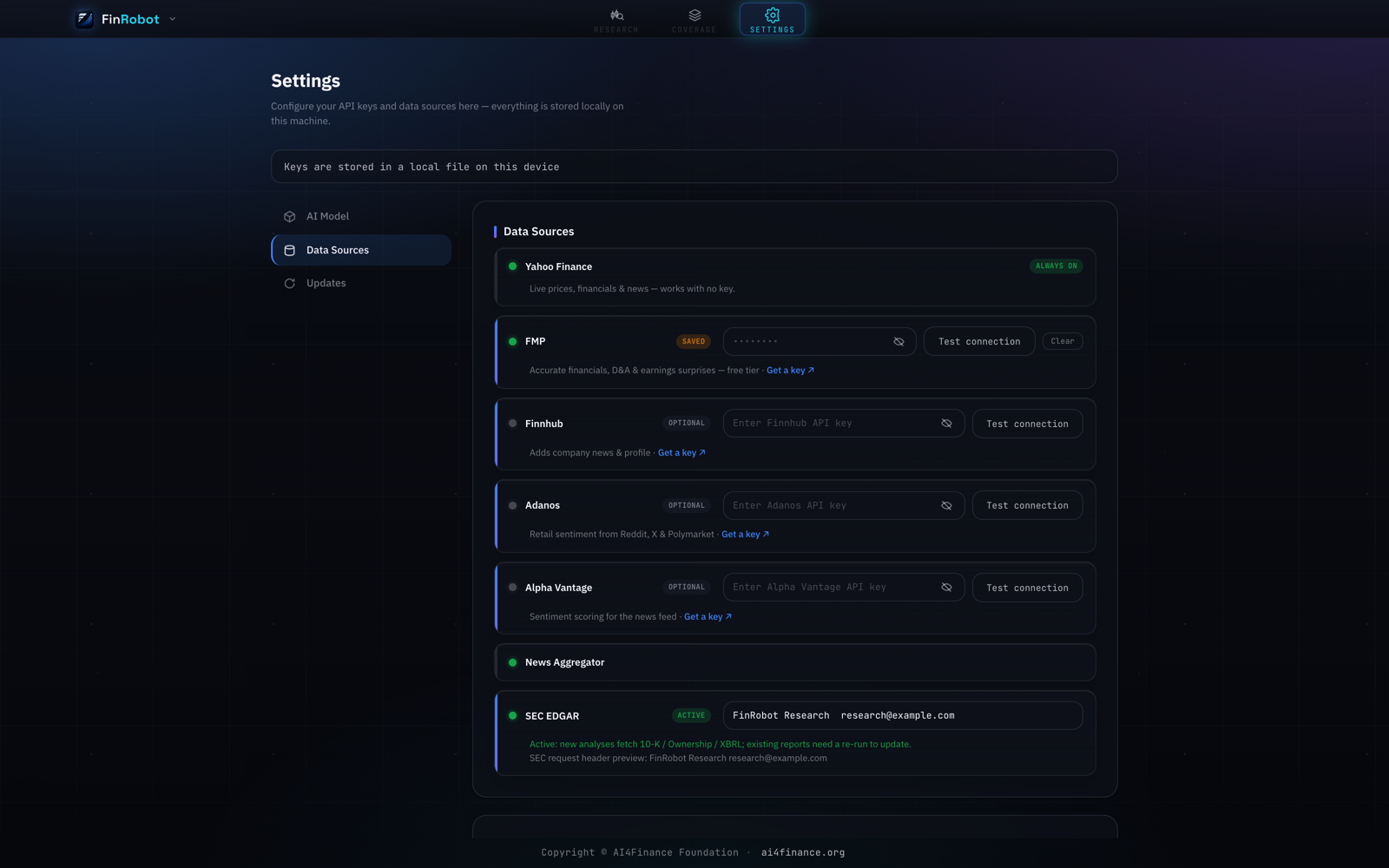
Each provider carries a health state — always on, saved, optional, cooling down — which is what the failover reads when a source stops answering.
Skills
skills/ holds 56 analyst playbooks as SKILL.md files, grouped by desk:
| Category | Count | Category | Count |
|---|---|---|---|
financial-analysis |
11 | equity-research |
9 |
private-equity |
10 | investment-banking |
9 |
partner-lseg |
8 | wealth-management |
6 |
partner-spglobal |
3 |
Browse them from the CLI with finrobot skill list and finrobot skill search <query>. Attribution for third-party material is in skills/ATTRIBUTION.md.
Install (macOS, Apple Silicon)
- Download
FinRobot_<version>_aarch64.dmgfrom the Releases page (or build it yourself — see below). - Open the
.dmgand drag FinRobot intoApplications. - First open — the app is not yet code-signed, so Gatekeeper will block a plain double-click. Either right-click the app → Open → Open, or clear the quarantine flag once:
xattr -dr com.apple.quarantine /Applications/FinRobot.app - First run — open Settings and paste your own LLM API key (DeepSeek / OpenAI / Anthropic). FinRobot orchestrates your LLM account; it does not ship a key. Until a key is set, the app opens fine but analysis requests return a “configure your API key” notice instead of running.
Running an analysis needs internet access (market data from yfinance / SEC EDGAR / optional FMP, plus your LLM provider). Launching the app and browsing existing reports does not.
Intel Macs, Windows, and Linux are not covered by the current release; on those platforms, run from source.
Use from the command line
Installing the Python package gives you a finrobot CLI independent of the desktop shell:
uv sync                          # or: pip install -e .
finrobot research AAPL           # full research artifact
finrobot dcf MSFT                # DCF (auto-switches to DDM where appropriate)
finrobot comps NVDA --peers AMD,INTC
finrobot ic-memo TSLA
finrobot ask AAPL "How exposed is the gross margin to tariffs?"
finrobot backtest ...            # needs the `backtest` extra
finrobot serve                   # run the backend on its own
Most commands accept --model to pick the LLM (e.g. anthropic:claude-sonnet-4-6) and --lang en|zh to set the output language.
Four notebooks in tutorials/ cover the same ground interactively: equity research, DCF valuation, backtesting, and RAG Q&A.
Run in a browser
The same backend and the same UI can run as a local web service, with no .dmg and no Rust toolchain — useful on Intel Macs, Linux, and Windows, where there is no desktop build.
Prerequisites: uv and Node 20+. Python 3.11+.
cd finrobot_desktop
uv sync                        # backend dependencies
(cd desktop && npm install)    # frontend dependencies — one time

./dev.sh                       # → open http://localhost:5173
A bare uv sync installs the base dependencies and removes any extras already in the environment, so if you have been working with --extra dev or --extra package, sync with those flags instead of dropping them:
uv sync --extra dev # keeps pytest / ruff / mypy installed
dev.sh starts two processes and wires them together:
  Vite dev server  :5173   ← you open this in the browser
        │  proxies /api, /chat, /health, /openapi.json
        ▼
  finrobot serve   :8321   ← FastAPI backend, run from source
It waits for the backend’s /openapi.json to answer before starting the frontend, and prints the backend log path (/tmp/finrobot-backend.log) if startup fails. Ctrl+C stops both. Backend edits need a restart of the script; frontend edits hot-reload.
Configure your LLM API key from the Settings page in the browser UI, exactly as in the desktop app — keys are stored in the OS keychain, not in a .env file.
Two things to know before you run it:
dev.shfirst kills whatever is listening on :8321 and :5173. If FinRobot.app is open, that includes its bundled backend. Quit the app first.- In browser mode the local API is unauthenticated. The desktop shell mints a per-launch capability token and the backend enforces it; a plain browser has no Tauri IPC to read that token from, so the backend starts with the auth middleware as a no-op (see
finrobot/auth.py). It still binds loopback only, but any other process on the machine can reach:8321while it runs — including/api/settings, which holds your keys. Prefer the desktop app on a shared machine.
finrobot serve on its own exposes only the JSON API — it does not serve the UI, so the Vite server is what makes the browser version work. There is currently no static production build for browser use either: npm run build emits assets for the desktop bundle, and npm run preview has no proxy configured, so its /api calls would not reach the backend.
Build from source
Prerequisites: uv, Node 20+, a Rust toolchain, and the Tauri CLI (cargo install tauri-cli → cargo tauri). Python 3.11+.
uv sync --extra package            # backend deps + pyinstaller (for the sidecar)
bash desktop/src-tauri/sidecar/build.sh
                                   # freeze finrobot-server into desktop/src-tauri/binaries/

cd desktop
cargo tauri dev                    # run the desktop app (debug)
cargo tauri build                  # produce FinRobot.app + .dmg under desktop/src-tauri/target/release/bundle/
build.sh freezes the backend into a PyInstaller sidecar, so a plain cd desktop && cargo tauri dev runs against that frozen binary — backend edits won’t show up until you re-run build.sh. For a live edit loop (backend source + frontend HMR, no re-freezing) use dev.sh:
./dev.sh            # browser shell  → http://localhost:5173  (see "Run in a browser")
./dev.sh --app      # desktop shell  → Tauri native window, live backend
--app sets FINROBOT_DEV_LIVE_BACKEND=1 so the Tauri shell skips spawning the bundled sidecar; the WebView then talks through the Vite proxy to the source-tree backend dev.sh started. Or run just the backend with hot reload: finrobot serve --reload.
Development
uv sync --extra dev
pytest tests/                                          # 237 test files; live-network tests are skipped by default
pytest tests/ --cov=finrobot --cov-report=term-missing
ruff check . && mypy finrobot                          # also wired into .pre-commit-config.yaml
Layout:
finrobot_desktop/
├── finrobot/              # Python backend
│   ├── engine/            #   agents, pipelines, compute, data, skills
│   ├── routes/            #   FastAPI endpoints (runs, artifacts, valuation, …)
│   ├── artifact/          #   report storage, contracts, semantic diff (SQLite)
│   ├── audit/ obs/        #   provenance checks and observability
│   ├── cli.py server.py   #   CLI and ASGI entry points
│   └── sdk.py             #   programmatic API
├── desktop/               # Tauri shell + React 19 / Vite 6 / Zustand / Recharts
├── skills/                # 56 analyst playbooks (SKILL.md)
├── tutorials/             # 4 notebooks
├── tests/                 # pytest suite, incl. Hypothesis property tests
└── scripts/               # maintenance and build tooling
CI (.github/workflows/desktop-ci.yml) runs the backend on Python 3.11 / 3.12 and the frontend on Node 22 / 24.
For deeper reference: finrobot/engine/instructions.md describes the engine’s contracts, finrobot/engine/agents/instructions/*.md holds each agent’s brief, and finrobot/sdk.py is the programmatic entry point.
License
Apache 2.0 — see LICENSE.