FinRobot
FinRobot Equity — V1
A self-hosted web app. AI-powered equity research report generator: fetches financial data, runs LLM-based analysis, and produces professional multi-page HTML/PDF reports — from a browser or a single command.
This is V1 in the FinRobot version lineage. It is a web service you deploy, not a desktop application and not a framework — you run ./deploy.sh start, open a browser, and people on your network get a form that turns a ticker into a report. That narrow shape is the point: one job, done through a UI.
Where it sits relative to the others:
finrobot_desktop/(V2) is the production agent system — a deeper research pipeline, a deterministic compute engine, and full numeric provenance. Choose it when the analysis itself matters most.- This project (V1) is the choice when browser access matters most: a shared internal tool, a demo, a hosted deployment behind your own auth.
finrobot_autogen/(V0) is educational — the AutoGen library behind the whitepaper.
Example output
NVDA · MSFT · TSLA · META · COP
The same files are checked in under core/output/.
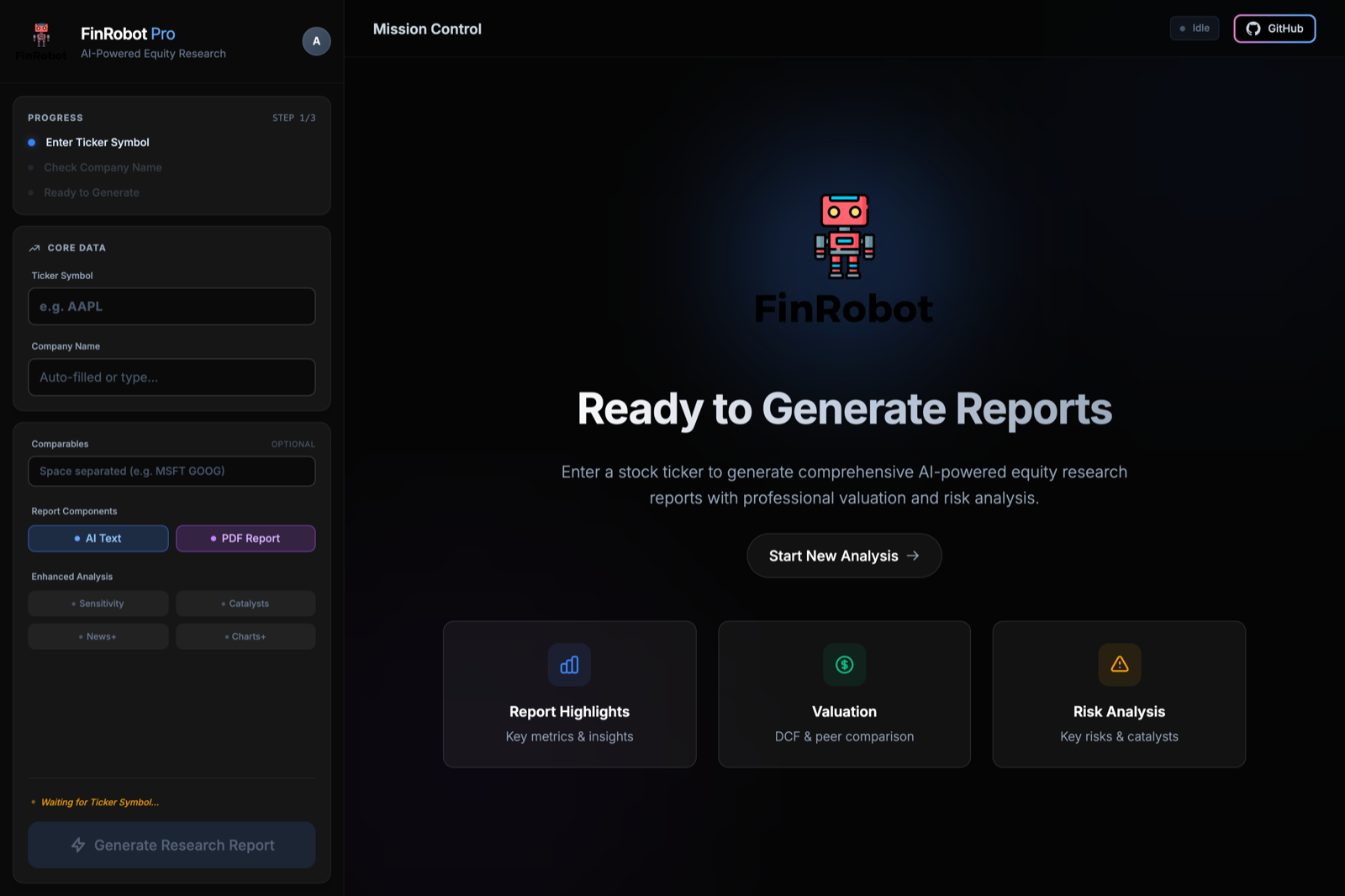
The interface you deploy — enter a ticker, pick the peers and the sections you want, and generate.
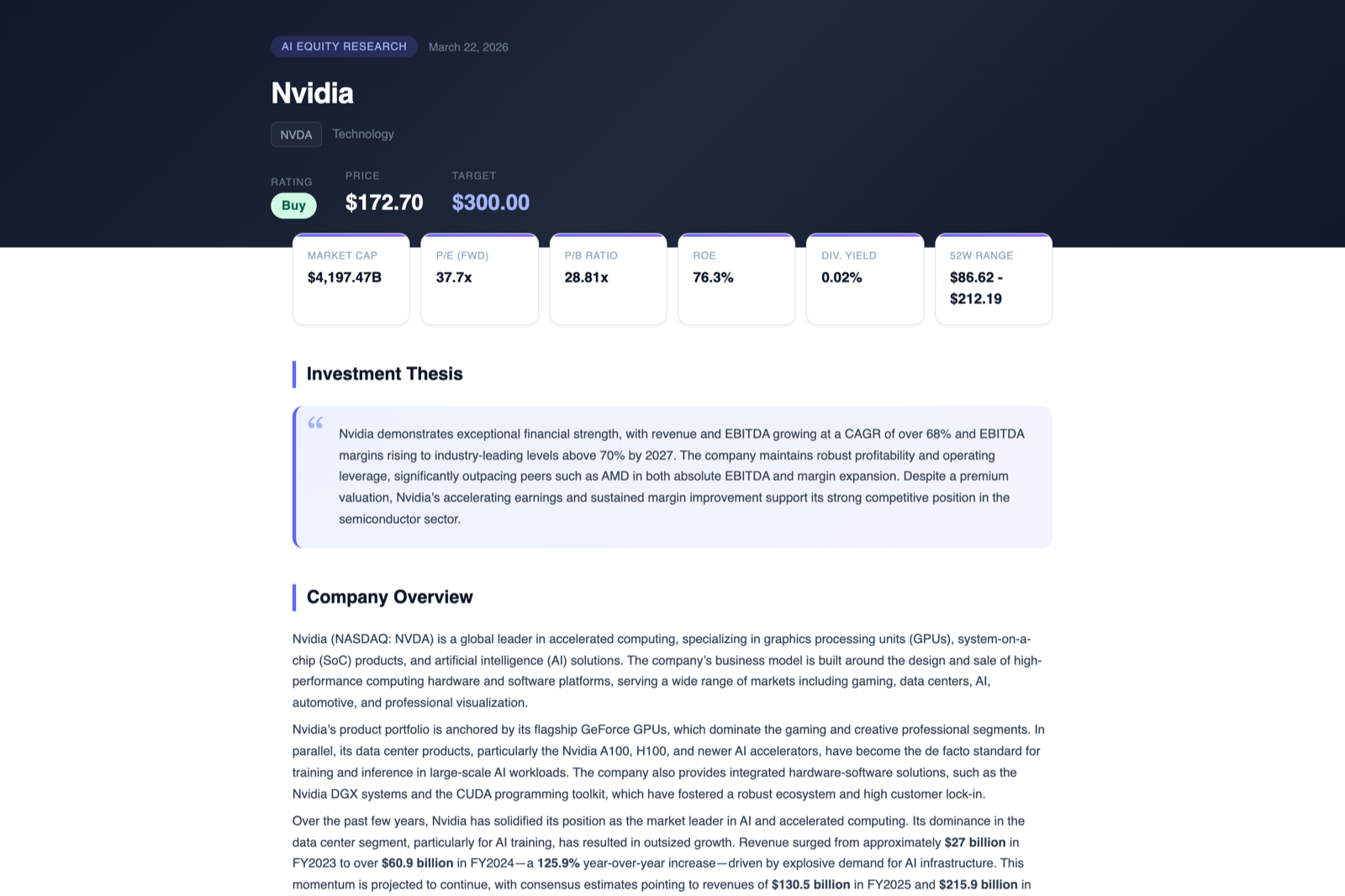
And what comes out: a standalone HTML report with a rating, a price target, the key multiples, and the thesis behind them.
Quick start
1. Configure API keys
From the repository root:
cp finrobot_equity/core/config/config.ini.example finrobot_equity/core/config/config.ini
[API_KEYS]
fmp_api_key    = YOUR_FMP_API_KEY       # https://financialmodelingprep.com/developer
openai_api_key = YOUR_OPENAI_API_KEY    # https://platform.openai.com/account/api-keys
adanos_api_key = YOUR_ADANOS_API_KEY    # optional — enables Retail Sentiment Insights
config.ini is gitignored; config.ini.example is the file under version control.
With adanos_api_key set, the pipeline adds an optional Retail Sentiment Insights layer on top of the news workflow — structured snapshots of public retail activity across Reddit, X.com, and Polymarket.
2. Run the web app
From this directory:
chmod +x deploy.sh
./deploy.sh start
Then open http://127.0.0.1:8001.
If deploy.sh doesn’t work in your environment, start it by hand:
python3 -m venv venv
source venv/bin/activate
pip install -r requirements.txt
python run_web_app.py           # --host / --port / --no-reload are available
3. Or run the two-step CLI pipeline
# Step 1 — fetch data, forecast, and generate the narrative sections
python finrobot_equity/core/src/generate_financial_analysis.py \
    --company-ticker NVDA \
    --company-name "NVIDIA Corporation" \
    --config-file finrobot_equity/core/config/config.ini \
    --peer-tickers AMD INTC \
    --generate-text-sections

# Step 2 — render the HTML report from step 1's outputs
python finrobot_equity/core/src/create_equity_report.py \
    --company-ticker NVDA \
    --company-name "NVIDIA Corporation" \
    --analysis-csv output/NVDA/analysis/financial_metrics_and_forecasts.csv \
    --ratios-csv   output/NVDA/analysis/ratios_raw_data.csv \
    --tagline-file             output/NVDA/analysis/tagline.txt \
    --company-overview-file    output/NVDA/analysis/company_overview.txt \
    --investment-overview-file output/NVDA/analysis/investment_overview.txt \
    --valuation-overview-file  output/NVDA/analysis/valuation_overview.txt \
    --risks-file               output/NVDA/analysis/risks.txt \
    --competitor-analysis-file output/NVDA/analysis/competitor_analysis.txt \
    --major-takeaways-file     output/NVDA/analysis/major_takeaways.txt \
    --peer-ev-ebitda-csv       output/NVDA/analysis/peer_ev_ebitda_comparison.csv \
    --enable-text-regeneration \
    --config-file finrobot_equity/core/config/config.ini
generate_pdf_report.py turns the HTML into a PDF as an optional third step. core/src/Run.ipynb walks the same pipeline in a notebook.
How it works
┌─────────────────────────────────┐     ┌──────────────────────────────┐
│  generate_financial_analysis.py │     │  create_equity_report.py     │
│                                 │     │                              │
│  1. Fetch data from FMP API     │────>│  1. Load analysis outputs    │
│  2. Process financial metrics   │     │  2. Auto-fetch market data   │
│  3. Generate 3-year forecasts   │     │  3. Generate charts          │
│  4. Run peer comparison         │     │  4. Render HTML report       │
│  5. AI text generation          │     │  5. Validate & regenerate    │
│                                 │     │                              │
│  Output: CSV + JSON + TXT       │     │  Output: multi-page HTML     │
└─────────────────────────────────┘     └──────────────────────────────┘
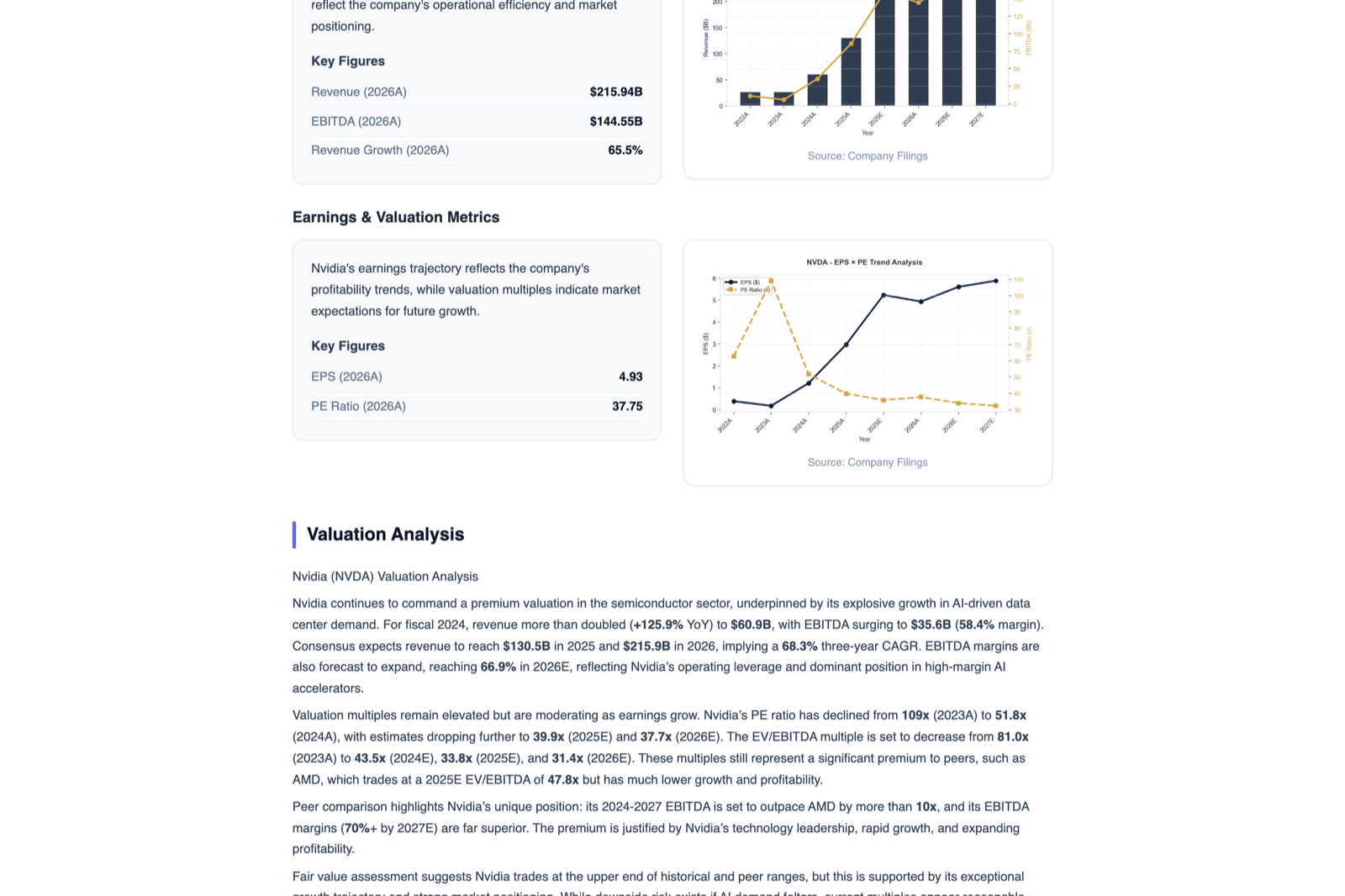
Each section pairs figures computed from the FMP data — revenue/EBITDA trajectory, EPS against the P/E multiple — with the paragraph an agent wrote about them.
Step 1 is deterministic up to the last stage: the statements, ratios, forecasts, and peer multiples are computed from FMP data before any model is called. Step 2 can optionally re-run the narrative agents (--enable-text-regeneration) when a section fails validation.
The agents
Eight section writers in core/src/modules/equity_agents/, coordinated by agent_manager.py:
| Agent | Section it writes |
|---|---|
tagline_agent |
One-line thesis for the cover |
company_overview_agent |
Business description |
investment_overview_agent |
Investment thesis |
valuation_overview_agent |
Valuation discussion |
risks_agent |
Risk assessment |
competitor_analysis_agent |
Competitive landscape |
major_takeaways_agent |
Key takeaways |
news_summary_agent |
News summary |
Each agent receives the already-computed numbers as context, so the narrative describes the model’s output rather than inventing figures.
Layout
finrobot_equity/
├── core/                                    # Analysis engine
│   ├── config/config.ini.example            #   API key template
│   ├── src/
│   │   ├── generate_financial_analysis.py   #   Step 1 — data + analysis
│   │   ├── create_equity_report.py          #   Step 2 — HTML report
│   │   ├── generate_pdf_report.py           #   Step 3 — PDF (optional)
│   │   ├── Run.ipynb                        #   Notebook walkthrough
│   │   └── modules/
│   │       ├── common_utils.py              #     Config & API key management
│   │       ├── market_data_api.py           #     FMP client
│   │       ├── financial_data_processor.py  #     Metrics extraction & forecasting
│   │       ├── valuation_engine.py          #     Valuation modeling
│   │       ├── sensitivity_analyzer.py      #     Sensitivity analysis
│   │       ├── catalyst_analyzer.py         #     Catalyst identification
│   │       ├── news_integrator.py           #     News integration
│   │       ├── retail_sentiment_client.py   #     Optional retail sentiment
│   │       ├── text_generator_agents.py     #     LLM orchestration
│   │       ├── enhanced_text_generator.py   #     Narrative post-processing
│   │       ├── chart_generator.py           #     Chart rendering
│   │       ├── enhanced_chart_generator.py  #     Advanced chart configs
│   │       ├── html_renderer.py             #     HTML renderer
│   │       ├── html_template_professional.py#     HTML templates
│   │       ├── report_data_loader.py        #     Data loading
│   │       ├── report_structure.py          #     Report layout
│   │       ├── pdf_generator.py             #     PDF generation
│   │       ├── professional_pdf_report.py   #     PDF templates
│   │       └── equity_agents/               #     The eight section writers
│   ├── output/                              #   Generated + checked-in sample reports
│   └── tests/                               #   test_generate_report, test_modules,
│                                            #   test_retail_sentiment_client
└── web_app/                                 # FastAPI web interface
    ├── main.py                              #   App entry point & API routes
    ├── auth.py                              #   Auth (local + GitHub OAuth)
    ├── admin_routes.py                      #   Admin endpoints
    ├── database/                            #   SQLAlchemy + SQLite
    ├── middleware/request_logger.py         #   Request logging
    ├── templates/                           #   index, login, parallel_dashboard
    ├── static/                              #   CSS & images
    └── data/                                #   Runtime data (auto-created, gitignored)
Reference
Deployment commands
Run from this directory, or from the repo root as ./finrobot_equity/deploy.sh … — the script resolves its own paths either way.
| Command | Description |
|---|---|
./deploy.sh start |
Start the web application (auto-installs dependencies) |
./deploy.sh stop |
Stop the application |
./deploy.sh restart |
Restart the application |
./deploy.sh status |
Check running status and recent logs |
./deploy.sh install |
Install/update dependencies only |
deploy.gcloud.sh covers Google Cloud Run deployment. The Dockerfile and .dockerignore stay at the repo root: the container imports the app as finrobot_equity.web_app.main, so the build context has to be the root with finrobot_equity/ as a subdirectory under it.
Environment variables
| Variable | Default | Description |
|---|---|---|
WEB_HOST |
127.0.0.1 |
Server bind address (read by deploy.sh) |
WEB_PORT |
8001 |
Server port (read by deploy.sh) |
DATABASE_URL |
local SQLite | Database connection string |
GITHUB_CLIENT_ID |
— | GitHub OAuth client ID |
GITHUB_CLIENT_SECRET |
— | GitHub OAuth client secret |
FINROBOT_ADMIN_EMAIL |
admin@finrobot.com |
Initial admin account |
FINROBOT_ADMIN_EMAILS |
— | Additional admin emails (comma-separated) |
FINROBOT_ADMIN_PASSWORD |
random | Initial admin password — printed on first start if unset |
ADANOS_API_KEY |
— | Retail sentiment key (alternative to config.ini) |
ADANOS_BASE_URL |
provider default | Override the retail sentiment endpoint |
External services
| Service | Required | Purpose |
|---|---|---|
| Financial Modeling Prep | Yes | Financial data, market metrics, peer comparison |
| OpenAI | Yes | Narrative generation for report sections |
| Adanos Finance API | No | Retail sentiment across Reddit, X.com, Polymarket |
Tests
pytest finrobot_equity/core/tests/
License
Apache 2.0 — see LICENSE.